Not a tech expert, just a wife on a mission. Are the Ray-Ban Metas actually worth the money? Or are they just another techy gimmick?
Do you have a pair? If so, what version are you planning to get? Let’s break down the Gen 2 and Display glasses, features, price, and who each one is for.
This one is not a review from a tech expert. It is from a wife who wanted to get the gift right. My husband lives in back-to-back meetings, never misses a single tech drop, has had a pair of glasses on his face since before I knew him, and somewhere in between all of that, always manages to forget both my calls and to charge his devices. Finding the perfect anniversary gift for someone like him is no joke.
I needed something that would finally make him pick up my calls. Something that would free up his permanently occupied hands. Something that looks sharp enough for a boardroom and works with his prescription glasses. And if it could somehow replace the two pairs he carries everywhere, one for indoors and one for the sun, because he somehow keeps losing his sunglasses, while staying charged, unlike the millions of other devices he owns? Tall order, I know. But that was the dream.
So, very skeptically, I went down the Ray-Ban Meta rabbit hole. And honestly, what I found surprised me. But I will be transparent, I had to pull in my brother, the IT guy of the family, to make sense of half of it. Consider him our cheat code for everything technical in this article.
But First, How Did We Get Here?
Ray-Ban Metas are what happens when Meta, the company behind Facebook, Instagram, and WhatsApp, decided to stop making social media and start making hardware. They partnered with Ray-Ban, one of the most iconic eyewear brands in the world, to build smart glasses that actually look like glasses. Not a headset. Not a visor. Just a regular pair of Ray-Bans with a camera, open-ear speakers, and Meta AI built right in.
Simple enough, right? I thought so too. Until I found out there are now two versions to choose from. The standard Ray-Ban Meta Gen 2 at $379, and the newer Ray-Ban Meta Display at $799. That is when I did what any self-respecting non-tech person would do. I called my brother. Between the two of us, a non-tech wife on a mission and a brother who lives and breathes this stuff, we are going to break down both versions so you can figure out which one is actually right for your person. Or in my case, my husband.
The Ray-Ban Meta Gen 2 | $379:
This is the one that started it all. My brother calls it the “safe bet,” and honestly, coming from someone who has never voluntarily walked into a tech store, I get why.
The built-in camera lets him take photos and videos completely hands-free, either by pressing a small button on the frame or simply saying, “Hey Meta, take a photo.” Videos are ultra-wide HD with crisp, vibrant colors. Basically, you see what he sees. I am just hoping that what he sees is that he is the problem and not me.
The open-ear speakers let him take calls and listen to music without touching his phone once. The one thing my brother flagged is that people nearby can faintly hear what is playing. So, probably not ideal for a quiet boardroom, but perfect for everything else. Including finally picking up my calls.
Meta AI is built right in. He can ask questions out loud, get real-time answers, identify music playing nearby, translate conversations live, and get AI descriptions of his surroundings. All hands-free. All through his glasses.
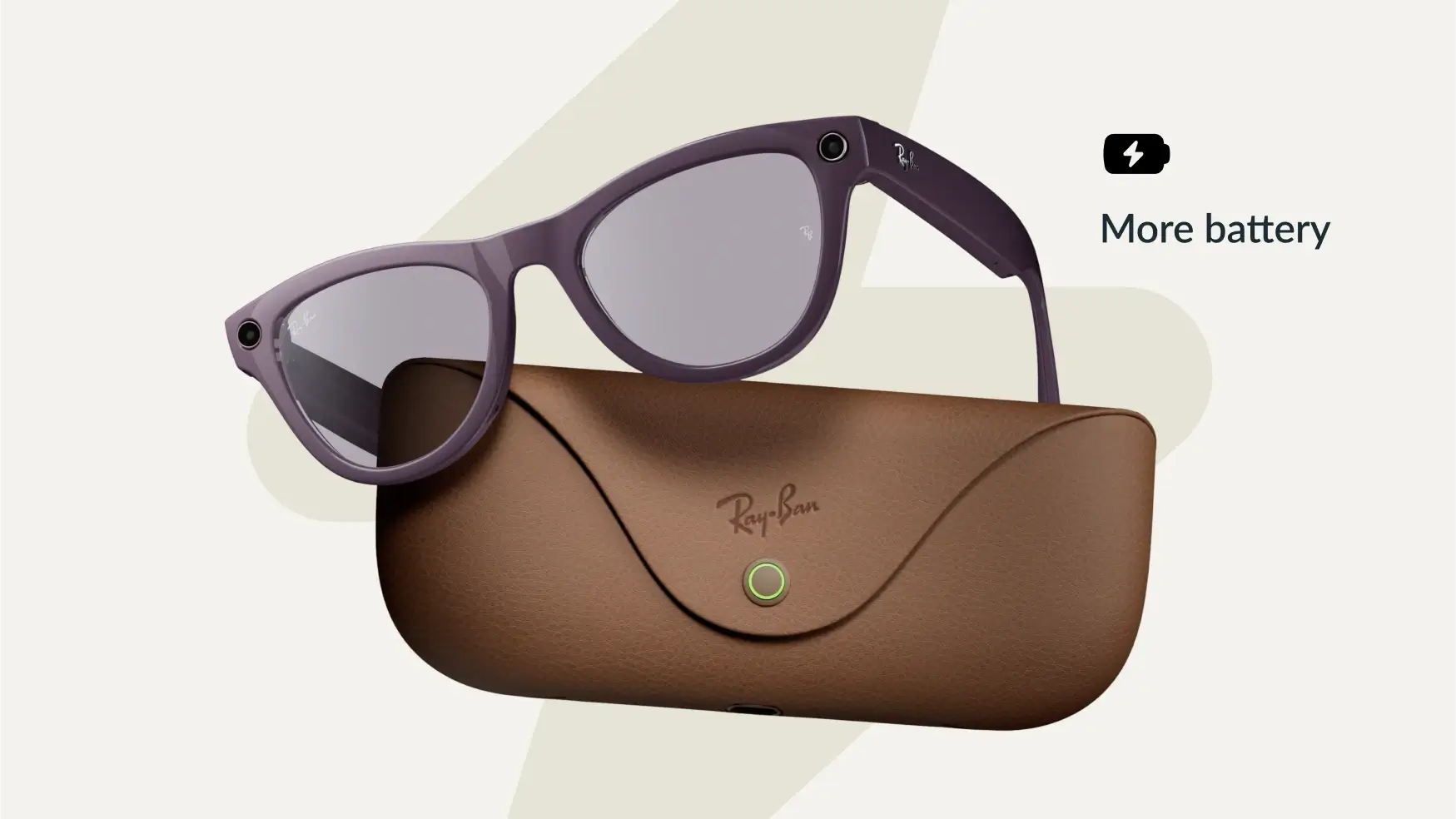
They can be fitted with prescription lenses and are water-resistant, making them solid everyday glasses. They start at $379, but here is the ‘wife-to-wife’ catch: that base price is for standard clear or tinted lenses. If you want the Transition lenses—the magic ones that turn into sunglasses automatically so he stops losing his second pair, that will bring the total to about $459. It’s still the practical choice, and the charging case is a lifesaver, providing up to 8 hours of use on a single charge for a man who always forgets his cables.
The Ray-Ban Meta Display | $799:
This is where my brother lost me for about ten minutes. And then I got it. And now I cannot stop thinking about it.
The Ray-Ban Meta Display is not just an upgrade. It is a completely different category. While the Gen 2 talks to you through speakers, the Display actually shows you things. There is a real screen built into the right lens, visible only to the wearer and completely invisible to everyone else. So he gets information right in his line of sight without looking like he is wearing a computer on his face. Which was the whole point.
The screen is crisp, bright enough to read in direct sunlight, and controlled through the Meta Neural Band, a small wristband that reads muscle signals from his wrist and turns them into gestures. A subtle flick to check a message. A small movement to take a photo. No touching the phone. No talking out loud in a meeting. Just quiet, invisible control.
It does everything the Gen 2 does, hands-free calls, Meta AI, live translation, music, and adds the display and gesture control on top. Because this is the premium model, it actually comes with Transition lenses as standard, which helps soften the blow of the $799 price tag since you aren’t paying for a lens upgrade. And the battery? My brother clarified that the 18-hour “miracle” battery is actually for the Neural Band (the wrist controller). The glasses themselves, because they are powering that cool in-lens screen, last about 6 hours of active mixed-use. However, the charging case can fast-charge them back to 50% in about 20 minutes, perfect for a quick “power nap” in the case between his back-to-back meetings.
The honest downsides, and my brother was upfront about this, are that it still relies on your smartphone to work, and the app ecosystem is still growing. It is impressive, but it is new. You are buying into where this is going, not just where it is right now.
Prescription lenses are available for an additional $200, bringing the total to $999.
So Which One is Actually Worth it?
Honestly, it depends on the person. But since we have been talking about my husband this whole time, let me break it down for both of us.
The Gen 2 at $379 is the practical choice. It solves every single problem on my list. Hands-free calls, prescription lenses, transition lenses, a charging case, and Meta AI built in. It looks like a regular pair of Ray-Bans because it is. Nobody in a boardroom is going to do a double-take. If you are buying for someone who needs a real upgrade to their everyday glasses without the learning curve, this is the one.
The Display at $799 is for someone who wants to be genuinely ahead of the curve. The in-lens screen, the gesture control, the 18-hour battery, it is a lot more for a lot more money. My brother thinks it is the obvious choice for a tech enthusiast who already lives hands-free and wants the full experience. I think he is right. I also think my husband would agree the moment he tried them on.
So are we getting them? We are still deciding between the two. But the fact that I went from a skeptical wife Googling anniversary gifts to someone who can now explain the difference between an EMG wristband and open-ear speakers says something. These are not a gimmick. They are a real product solving real problems for a very specific kind of person.
And that kind of person? Always in a meeting, never charges his devices, never misses a tech drop, and has worn glasses every single day since before I knew him. If that sounds familiar, drop your thoughts in the comments. We are figuring this out together.